
Part of my SC-500 study series: hands-on labs in a test tenant, one concept at a time.
Goal: Read the previous lab’s resources back through free foundational CSPM. Confirm no paid plan is on, find the recommendations my own choices produced, and trace one down to the Azure Policy definition that generates it.
Why this matters#
The earlier labs chose some things for security (no public IP, no inbound rules) and others for convenience (no backup, default disk encryption). Defender sorts them into passing and failing without being told any of it.
Prerequisites#
- The resource group from Secretless VM: Managed Identity, Bastion, and Key Vault, still deployed. The VM can stay deallocated, since Defender assesses configuration rather than runtime
- Security Reader at minimum, or Security Admin to change plan settings
Do not turn on a Defender plan. Every plan offers a 30-day trial and the clock is per-subscription, per-plan. Turning one on to look around burns it.
Step 1 - Decline the upsell#
Opening the blade pops a modal offering Defender CSPM. Choose No thanks.
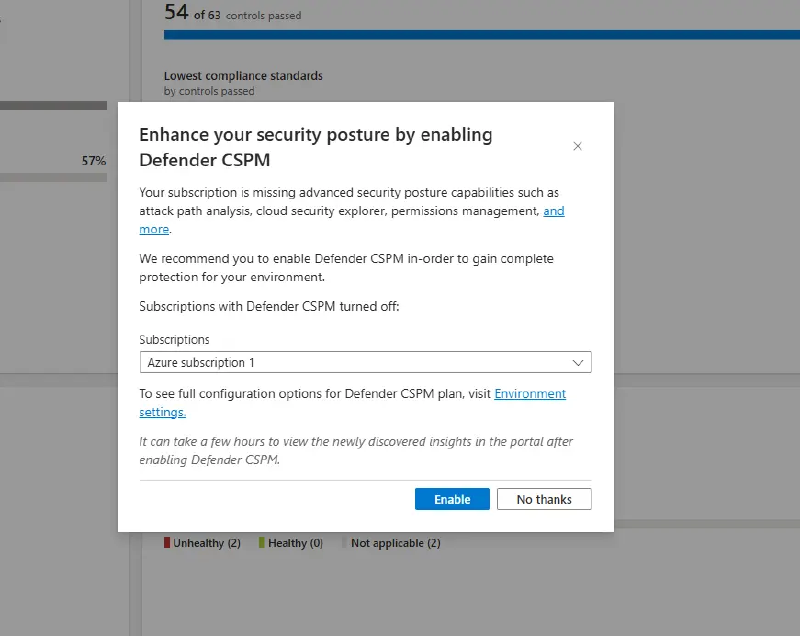
What it advertises (attack paths, cloud security explorer, permissions management) is the paid half by definition. The free half is already running behind the dialog, which is why there is a score there at all. The same offer recurs elsewhere, including “Enable all plans” in Environment settings.
Step 2 - Confirm you are on the free tier#
Management > Environment settings > the subscription > Defender plans. Every row should read Off except Foundational CSPM, which is on, free, and cannot be turned off.
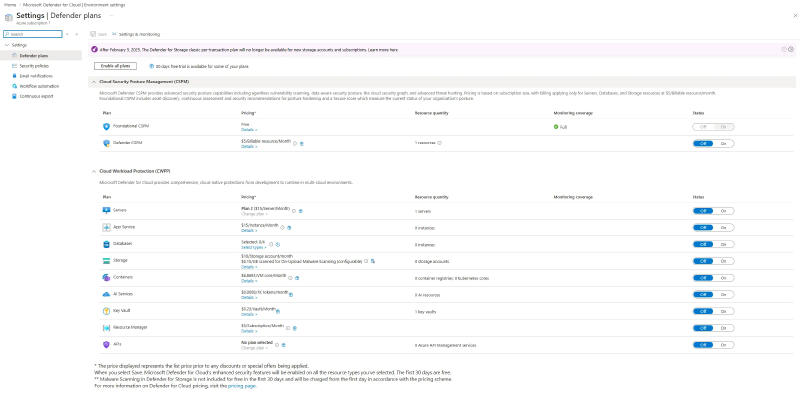
az security pricing list --query "value[].{plan:name, tier:properties.pricingTier}" -o tableEverything should show Free. Foundational CSPM is not something you enable: it applies the moment the blade is first opened and assigns the Microsoft cloud security benchmark (MCSB) as the default standard, so a brand-new subscription shows an empty dashboard for a few hours.
Step 3 - Read the secure score#
Overview > the Secure score tile. The score is per subscription, and only built-in MCSB recommendations count toward it.
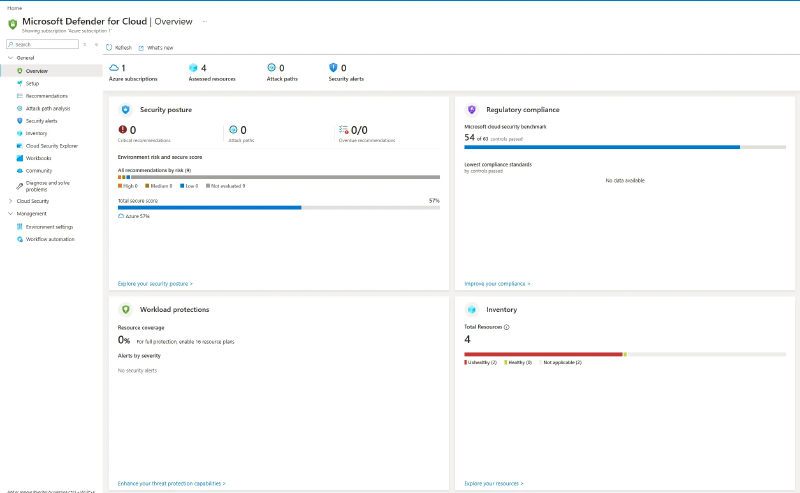
Recommendations > Secure score recommendations breaks it down by security control, which is where the math lives. Leave the filters cleared, because filtering changes the list without changing the number.
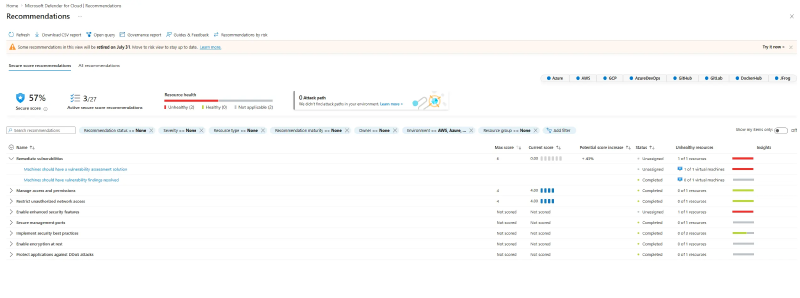
Each control has a fixed Max score and a Current score of (max / total resources) x healthy resources. Here that is 0 of 6, 4 of 4, and 4 of 4: eight points out of fourteen, which is the 57% on the tile, and the empty control’s 6/14 is the +43% beside it. Controls reading Not scored drop out of the denominator entirely, which is why a small subscription is graded against fourteen points rather than the full weight table.
The free tier has a ceiling.
Remediate vulnerabilitiesstays at 0 because Machines should have a vulnerability assessment solution requires Defender for Servers. One unfixable control holds a third of the score hostage, and the only remediation is a paid plan. That is how posture scoring drives purchasing, and the exam’s “how do you improve secure score” answers assume the plans are on.
Note that the Defender portal shows a different, risk-based score. Not comparable; exam questions about control weights mean the classic one above.
Step 4 - Find your own resources#
Filter Recommendations by the lab resource group.
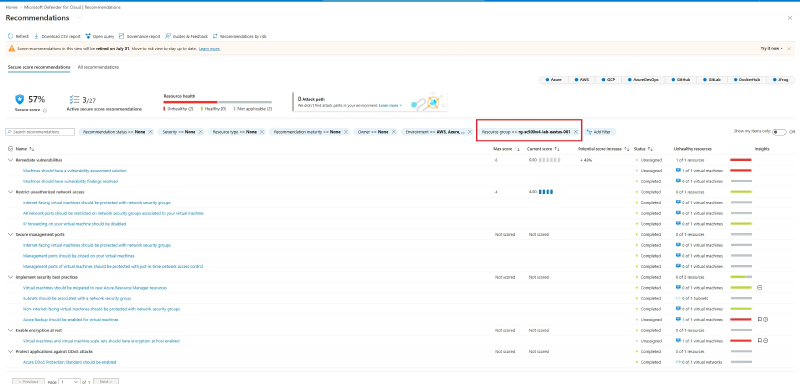
Three rows come back unhealthy, and each is a choice I made:
| Unhealthy recommendation | What I did |
|---|---|
| Machines should have a vulnerability assessment solution | Requires Defender for Servers, unfixable free |
| Azure Backup should be enabled for virtual machines | Never configured a vault or policy |
| VMs and scale sets should have encryption at host enabled | Accepted platform-managed disk encryption |
Everything else passes, including all four rows under Restrict unauthorized network access. That is the secretless design being graded from the outside: no public IP and no inbound rules means internet-facing protection, restricted ports, closed management ports, and JIT all come back clean. Secure management ports, normally an 8-point control, reads Not scored for the same reason.
The Initiatives column reads ASC Default on every row. That is MCSB under its internal name, and it is Step 5’s point visible from the list.
Only assessed resources appear. Resource health counts four, though the group also holds a Key Vault, a workspace, a NAT gateway, and a public IP. An unevaluated resource produces no rows in either direction, so check Inventory before reading silence as safety.
Step 5 - Trace a recommendation to its policy#
Open Azure Backup should be enabled for virtual machines.
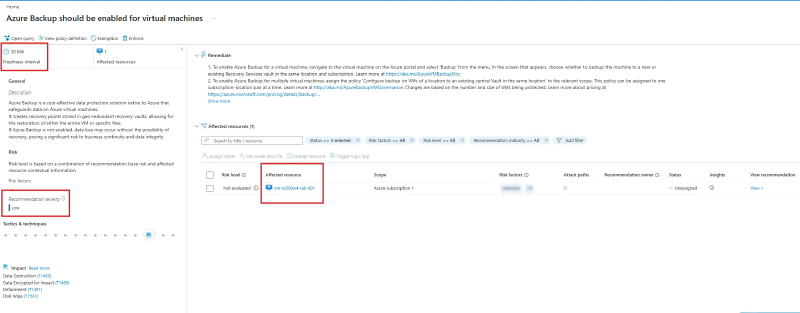
Freshness interval is per recommendation, not global. This one re-evaluates every 30 minutes and others run far slower, which is why a control and the recommendations under it routinely disagree on counts.
View policy definition is the part worth internalizing: it opens the Azure Policy built-in that produces this assessment, the same engine as the Deny policy in Custom RBAC Role + Azure Policy + Resource Lock. Defender’s recommendations are policy evaluations, and MCSB is an initiative assigned to your subscription.
Which toolbar buttons appear depends on that policy, not on importance. Fix needs a one-click remediation, and creating a Recovery Services vault is a deployment rather than a property flip. Deny needs a property checkable at creation time, and you cannot deny a VM for lacking a backup configured afterward. That leaves Enforce, which assigns the policy so future VMs get remediated automatically. Do not click it: the assignment outlives the resource group.
Step 6 - Regulatory compliance#
MCSB is present and free. Expand a failing control to see which assessments roll into it.
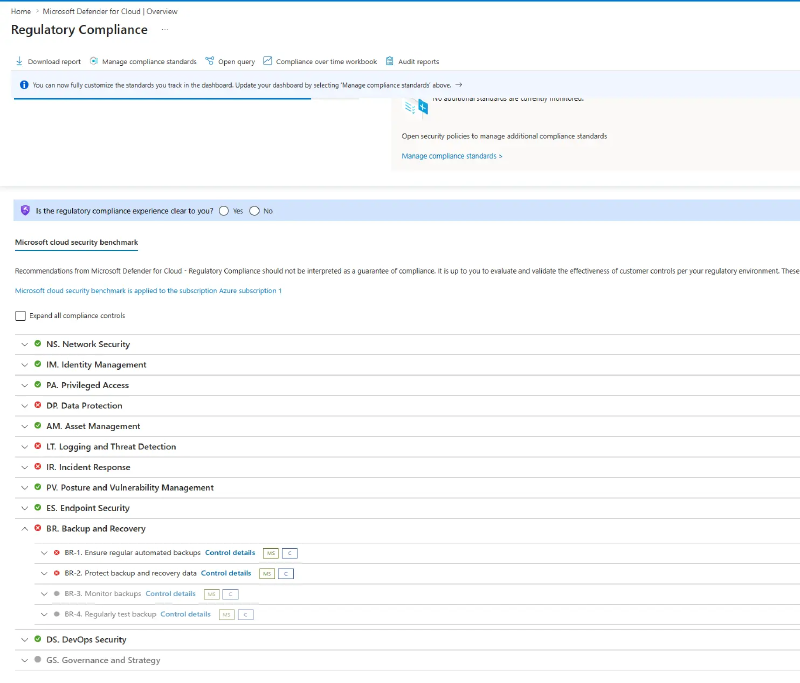
Control families worth recognizing: IM identity, PA privileged access, DP data protection, NS network security, LT logging and threat detection, AM asset management, BR backup and recovery, IR incident response, PV posture and vulnerability management.
Every other standard (PCI DSS, ISO 27001, CIS, NIST SP 800-53) needs Defender CSPM. The Manage compliance standards button is there; the standards behind it are not free.
Cleanup#
Delete the previous lab’s resource group. Recommendations for deleted resources disappear on the next cycle rather than immediately: controls recalculate every eight hours, and each recommendation runs on its own freshness interval. “I fixed it and the score didn’t move” is almost always that.
Key takeaways#
- Foundational CSPM is free, always on, and cannot be disabled. The paid halves are Defender CSPM (attack paths, extra standards) and the per-workload plans (threat detection).
- Secure score is per-control weights, not per-recommendation. A control only maxes out when every resource in it is healthy, and an unfixable control can cap the whole score.
- Recommendations are Azure Policy evaluations wearing a different UI, and the Initiatives column names the initiative:
ASC Default. - A resource with no recommendations may be compliant or may simply not have been assessed. Check Inventory before assuming.
- Fix repairs what exists; Enforce and Deny change what happens next. A recommendation offering only Enforce is normal.
Related labs#
- Secretless VM: Managed Identity, Bastion, and Key Vault built the resources this lab assesses
- Custom RBAC Role + Azure Policy + Resource Lock is the policy engine underneath every recommendation