
Part of my SC-500 study series: hands-on labs in a test tenant, one concept at a time.
Goal: Stand up both layers of Azure AI security and prove they act independently. A content filter bound to the model blocks a harmful prompt from a perfectly authenticated caller, and an API Management gateway blocks an unauthenticated caller sending a benign one.
Why this matters#
The exam frames AI security as defense in depth, and the trap answer always assumes one control covers everything. The guardrail attaches to the model deployment and inspects content, knowing nothing about who called. The AI gateway enforces what the model cannot see: caller authentication, token limits, and managed-identity backend auth. “Which layer stops this?” is the recurring question shape, and three requests at the end answer it.
Prerequisites#
- Owner or Contributor on the subscription, plus permission to create a role assignment.
- Cognitive Services OpenAI Contributor to deploy a model.
- A region with both model quota and Consumption-tier APIM availability. East US works for both.
Deploy the model and set its content filter before wiring the gateway.
Step 1 - Deploy the model#
In the Azure portal, create an Azure OpenAI resource named oai-sc500-lab-eastus-001 in a new resource group, Standard S0, all networks.
Open the resource, click Go to Azure AI Foundry portal, then Deployments, and deploy gpt-4.1-mini named gpt-41-mini-guardrail. Take whatever version the dropdown offers as current, since these version strings retire on a rolling schedule.
Confirm the deploy dialog targets oai-sc500-lab-eastus-001 first. Deploying from Foundry’s default project drops the model into an auto-created AIServices resource in another region, and APIM will later show your resource with 0 deployments.
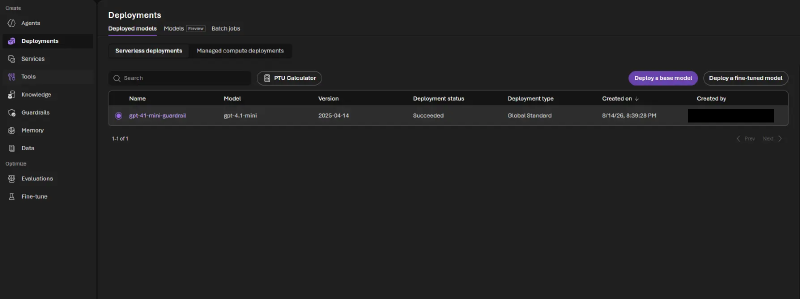
These captures were taken with the New Foundry toggle off. Flip it off if your portal does not match.
Step 2 - Build the guardrail#
The content-filter wizard’s blocklist toggle only selects an existing list, so build the blocklist first. Under Guardrails + controls, open the Blocklists tab, create bl-sc500-codewords, and add the term REDSTAPLER, a made-up project codeword.
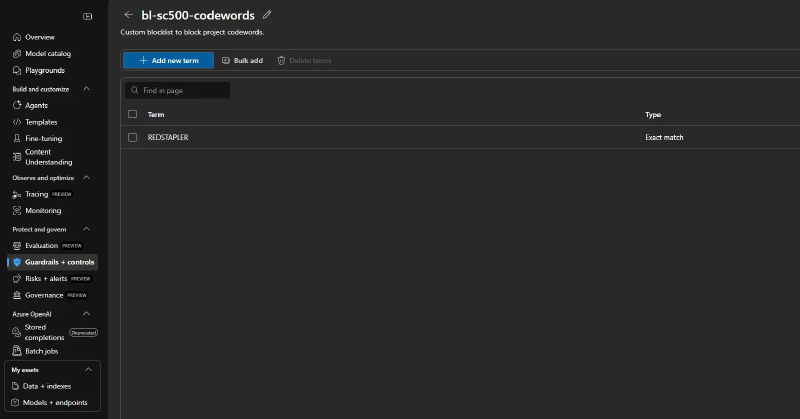
Now open Content filters and create cf-sc500-strict. Leave the four categories (hate, sexual, violence, self-harm) enabled on input and output, turn on Prompt shields for jailbreak attacks, toggle Blocklist on and select bl-sc500-codewords, then apply the filter to gpt-41-mini-guardrail.
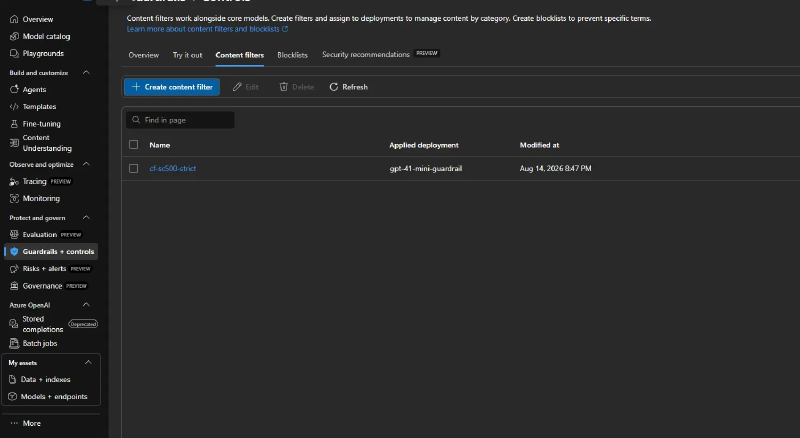
The categories are on by default, so the blocklist is the part worth capturing: it is how an org enforces its own disallowed terms, and being a separate object you bind rather than a field on the filter is what exam scenarios hang on.
Verify: in the Foundry chat playground, send a prompt containing REDSTAPLER.
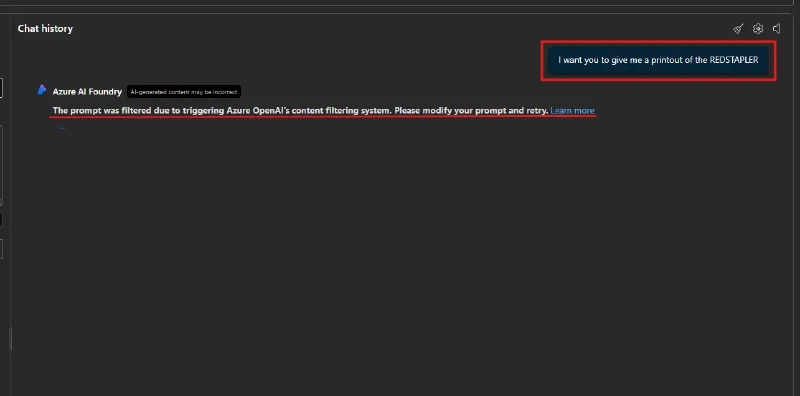
That is the layer-1 proof, with no gateway in front. The guardrail binds to the model, not the caller.
Step 3 - Provision the AI gateway#
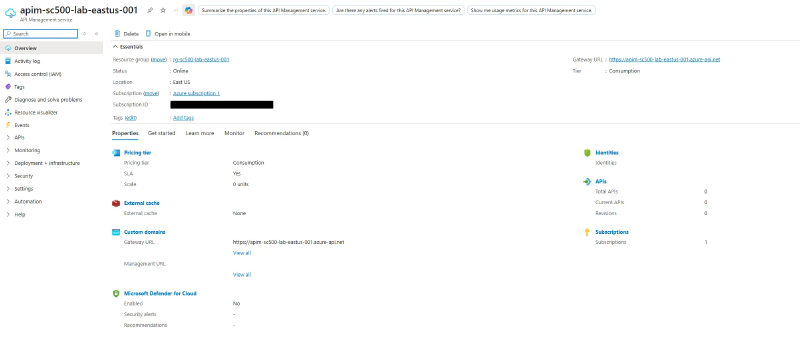
Create an API Management instance named apim-sc500-lab-eastus-001 in the same region, system-assigned managed identity On.
The create blade defaults the tier to Standard v2 and does not list Consumption in the dropdown. Click View all pricing tiers to reach it. You will know it worked when the Unit(s) selector disappears. Consumption provisions in a few minutes; dedicated tiers take 30 to 45.
On the Azure OpenAI resource, open Access control (IAM) and grant Cognitive Services OpenAI User to the APIM managed identity.
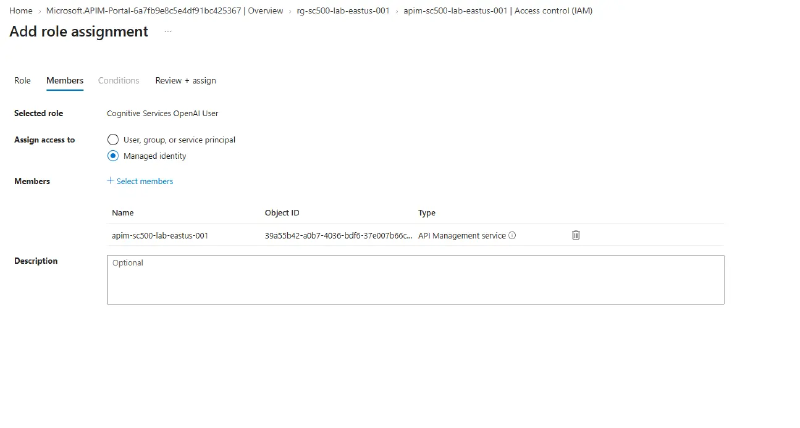
This is what lets the gateway hold zero secrets.
Step 4 - Import the model as an API#
In APIM, go to APIs, + Add API, and under Create an AI API pick the Microsoft Foundry tile, then select the Azure OpenAI resource and the gpt-41-mini-guardrail deployment. Not Language Model API next to it, which targets a generic OpenAI-compatible endpoint by URL and key, skipping the identity binding this lab is about.
The wizard creates a Backend for the endpoint and wires managed-identity auth onto it, so the inbound policy is just:
<inbound>
    <base />
    <set-backend-service id="apim-generated-policy" backend-id="oai-sc500-lab-eastus-001-ai-endpoint" />
</inbound>
The Backend entity holds the identity credential, which is why no key and no inline auth policy appear. Leave it as imported, and keep subscription required on, since that is the caller-auth layer.
The obvious next policy is
azure-openai-token-limit, which caps tokens per minute per caller and returns 429. Consumption supports none of the throttling policies and rejects it with “Policy is not allowed in ‘Consumption’ sku.” Which tiers can enforce GenAI token limits? Everything except Consumption.
Step 5 - Three requests#
Each request isolates one control.
| # | Request | Expected | Layer that acted |
|---|---|---|---|
| A | Benign prompt, valid key | 200 with a completion | none, baseline |
| B | Benign prompt, no key | 401 from APIM | Layer 2, gateway auth |
| C | REDSTAPLER prompt, valid key | 400 content-filter error | Layer 1, model guardrail |
Two details first: the Foundry import renames the subscription-key header to api-key, matching Azure OpenAI’s native header, and the data-plane path adds an /openai segment, so copy the exact URL from the Test tab.
Request A, from the APIM Test tab: pick the chat completions operation, set deployment-id and api-version, and send a benign prompt.
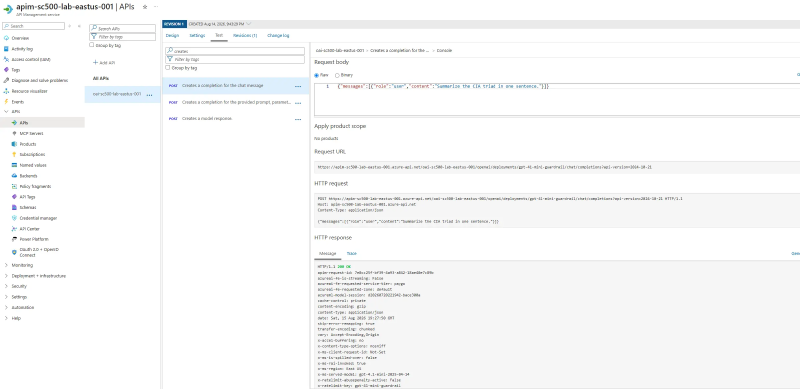
One 200 proves two things: the gateway accepted your subscription key, and it authenticated to the model with its managed identity.
Request B, from a shell, since the Test console always injects a key. Cloud Shell works, because curl does not inherit your az login.
curl -i -X POST \
  "https://apim-sc500-lab-eastus-001.azure-api.net/oai-sc500-lab-eastus-001/openai/deployments/gpt-41-mini-guardrail/chat/completions?api-version=2024-10-21" \
  -H "Content-Type: application/json" \
  -d '{"messages":[{"role":"user","content":"hello"}]}'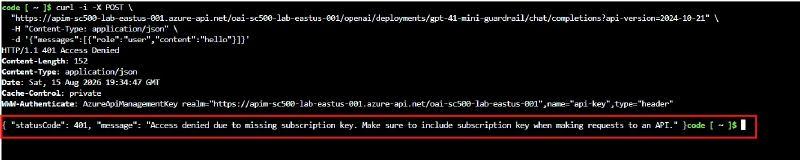
The request never reached the model. Add -H "api-key: <primary-key>" and the same call flips to 200, confirming the key was the only variable. A 404 instead means the /openai segment is missing, since APIM matches the operation before checking auth.
Request C is request A with the codeword: {"messages":[{"role":"user","content":"What is project REDSTAPLER about?"}]}.
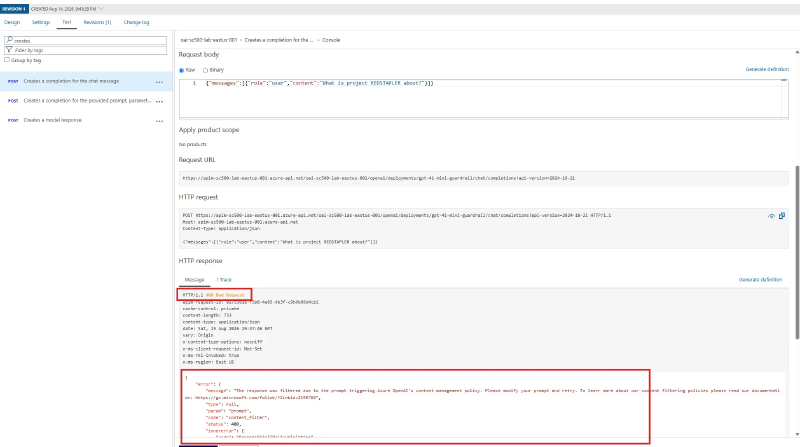
Valid key, well under quota, still blocked. Layer 1 lives at the model and fired as the response passed back through a gateway that never inspects content.
Delete the resource group when you are done. The Azure OpenAI account lands in a soft-deleted state that keeps its name reserved, so purge it under Manage deleted resources before re-running with the same name.
Key takeaways#
- Content filters and blocklists bind to the model deployment and fire regardless of caller identity, key, or quota.
- A custom blocklist is a separate object you create before the content filter, then select from it.
- APIM enforces what the model cannot see: caller auth, token quotas, and secretless backend auth.
- The Foundry import puts managed identity on a Backend entity, so an empty-looking inbound policy is still secretless.
- Consumption supports no throttling policies, so token limits need a dedicated tier.
Related labs#
- Secretless VM: Managed Identity, Bastion, and Key Vault is the same managed-identity pattern on compute instead of a gateway.
- Key Vault Defense in Depth and Policy Enforcement covers the layered-control framing on secrets.